Choosing a tool
Crypto copy-trading bots compared: fees, wallets and controls
Compare Maya, CopyFomo, Banana Gun and Quickscope for onchain copying. Check the source trader, execution network, fees, exits and wallet permissions.
Start with the wallet you want to copy and the network it trades on. Then compare buy limits, exits, wallet permission and the full cost of a buy and sale. The table below compares Maya, CopyFomo, Banana Gun and Quickscope using their published information. We haven't run a speed test between them.
Start with the trade you want to copy
Check which market the bot serves. A forex signal copier, an exchange futures service and an onchain wallet bot place different kinds of trades. Choose for the wallet, network and trade you actually want to follow.
Walk through one buy and sale in each product. Where will the funds sit? What authorizes the order? Which rule can skip it, and how will the sale happen? Those answers tell you more than a slogan or follower count.
Four tools and their documented starting points
Checked on 18 October 2026 against the products' own documentation. Confirm the current settings and quote before funding. A feature we couldn't verify is marked as unknown.
| Tool | Starting point | What to verify before funding |
|---|---|---|
| Maya | Fomo profile or wallet; saved rules in dashboard, Mini App or chat | Selected wallet/network, Paper or Live, permission and effective rules |
| CopyFomo | Telegram flow with Fomo trader and wallet-finding tools | Per-trader sizing/exit settings, account guards and current fee quote |
| Banana Gun | Telegram wallet copying; broader bot and web trading tools | Target address, chain-specific copy settings and current fee quote |
| Quickscope | Fomo-linked copying; its setup guide describes Robinhood Chain | Current supported network, funded account and eligible signal behavior |
Compare the permission model before the feature list
Find both the trading-permission screen and the way to revoke that permission. Keeping control of a wallet can still include allowing a service to trade from it. Check key export and withdrawal access separately.
Maya opens its secure wallet interface for setup and permission. Check the account and network there. Keep recovery phrases and keys out of ordinary bot or support conversations. Read the other tool's wallet instructions before granting it access.
Use budgets as well as a per-buy amount
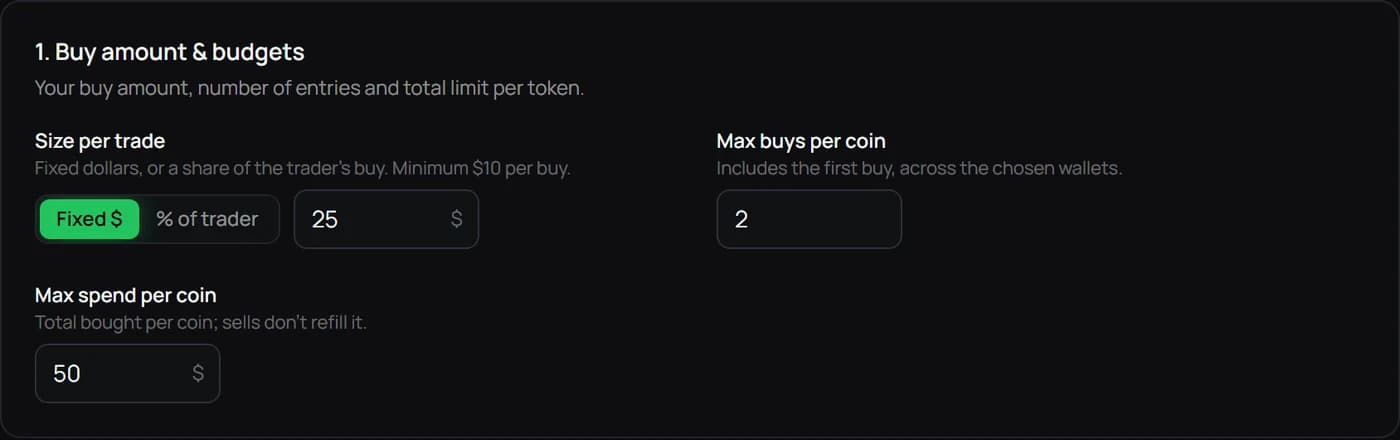
A fixed order size does not cap the number of signals. A trader buying one token repeatedly or moving across several tokens can spend much more than one order's value. Compare maximum entries per token, total token budget, filters and the handling of multiple followed traders.
In Maya's example editor, the $25 size, two-entry limit and $50 token budget are separate controls. The numbers demonstrate how the fields relate. They are not recommended settings, an account-wide loss limit or evidence that a particular trader is worth copying.
Compare exits under the same scenario
Check what happens when the leader sells part of a position, your take profit fires first or you pause the copy. These choices determine what you still hold. A stop can also fill below its threshold when price moves quickly or liquidity is thin.
Maya offers copied sells and independent exits. CopyFomo describes both in its manual. Banana Gun's Solana walkthrough covers copied sells and attached exit orders, and Quickscope has separate exit documentation. Check the chosen chain's rules for partial sales and pausing.
Calculate both sides of the cost
At Maya's standard 2% service rate, a $100 buy costs $2 in service fees and a later $100 sale costs another $2. That's $4 before gas, venue costs and slippage. An eligible MAYA holding removes the Maya service percentage; the other costs and trading risk remain.
Banana Gun's Solana walkthrough states 1% per side. Check the exact chain and order type. We couldn't establish one current fee rate for all CopyFomo executions from the reviewed manual, so ask for the quote.
Compare equal trade values and include both sides. A lower percentage can still come with a worse fill. A holding-based discount also ties up capital in an asset whose price can change.
Which workflow should you try first?
If you start with a Fomo profile, check how the tool finds the right wallets and lets you select them. If you already have an address, start with its execution network and the buy and sell controls you need. Review manual trading or sniping separately if you want those too.
Maya lets you review a profile or wallet, set copy rules and use a separate Paper view before deciding on Live. Open the setup guide to see that process. Choose another tool if its current controls, costs or supported networks suit your task better.
Questions to settle before enabling Live
Before enabling Live, check the account, wallet, execution network, cash and gas. Make sure you can explain a skipped buy, a partial sale and the pause control. Resolve anything unclear before confirming.
The screenshots show example settings, not account performance. Check the linked documentation for changes and use Maya's official support route to report a correction.
Keep your next step clear.
Review the wallet, network and copy rules before starting.
Open Maya dashboard →Read the full guide →